· Alec Reimel · 2 min read
ccstatusboard — Terminal Dashboard for Claude Code Sessions
- TypeScript: Strict ESM codebase
- Node.js 22+: Runtime
- Ink & React: Terminal UI rendering
- Zod: Config and API response validation
- tsup: Bundling to a single CLI file
- Bun: Standalone Linux and macOS binaries
- Vitest: Unit, UI, and integration tests
- Astro: Documentation site
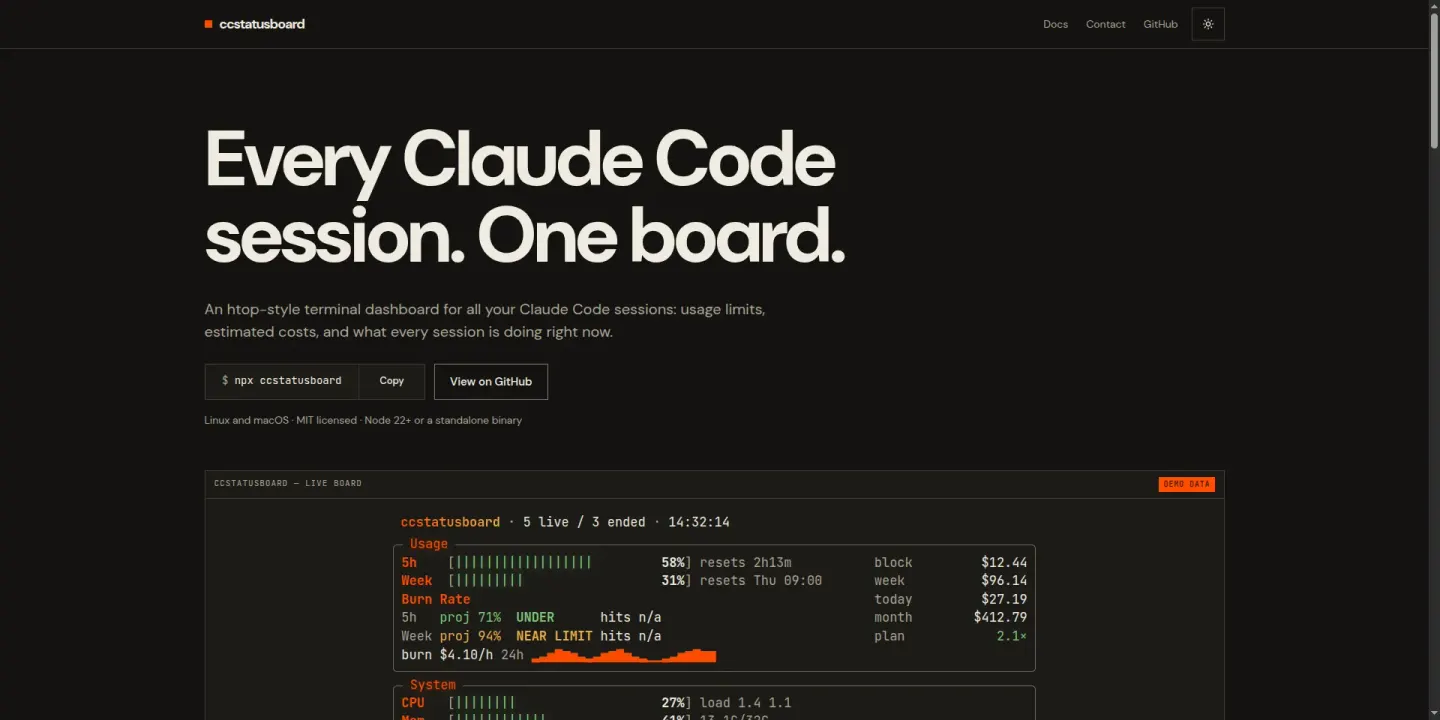
An htop-style terminal dashboard that reads local Claude Code session files to show usage limits, burn-rate projections, estimated cost, and per-session status. Built with TypeScript and Ink.
Every Claude Code Session, One Screen
12 Themes
4 Main Panels
73 Test Files
From Local Files to Terminal Panels
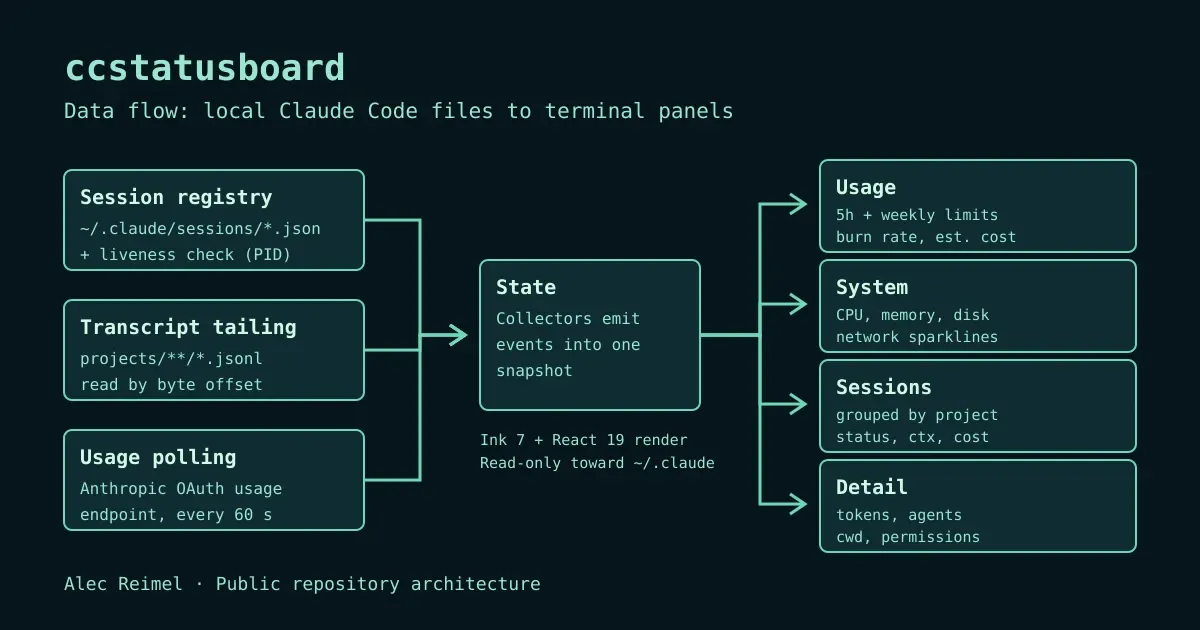
Architecture and Implementation
Collectors are kept separate from pure domain logic and from the UI. Sessions are discovered from the registry files, and liveness is checked with a signal-zero kill plus, on Linux, the process start time from /proc to avoid mistaking a reused PID for a live session.
Usage limits come from the Anthropic OAuth usage endpoint, polled every 60 seconds by default, with backoff and a 5-second timeout.
Burn-rate projection blends 60% recent trend with 40% average and maps the result to UNDER, NEAR LIMIT, OVER, and CRITICAL bands. It is most reliable once a few minutes of data exist.
The System panel shows CPU, memory, swap, disk, and network sparklines, with extra metrics on Linux such as temperatures and pressure stall information.
Layout is budgeted by terminal size: the System panel is hidden on short terminals and panels stack on narrow ones.
Packaging uses tsup for the npm build and Bun compile for standalone binaries (linux-x64, darwin-arm64, darwin-x64), with an install script that verifies SHA-256 checksums.
Explore the
session registry
,
burn-rate formula
, and
root UI component
.
Limits and Caveats
Costs shown are estimates calculated at API list prices from a public price table. They are not actual billing, and they can differ from what a Pro or Max subscription is charged. The tool reads local Claude Code session files read-only, and it uses the stored OAuth token only for the usage call; the —no-usage-api flag turns that network call off.
ccstatusboard relies on undocumented Claude Code internals (the session registry, transcript format, and usage endpoint), verified against Claude Code 2.1.x, so a Claude Code update may break it. It shows a warning for versions it has not been tested against. Windows is not supported, and there is no standalone binary for Linux arm64, where the npm install is the option.
See the
documentation site
or the
project repository
.
What This Project Demonstrates
TypeScript tooling for developers, a React-based terminal UI, incremental file tailing, defensive handling of undocumented data sources, and packaging for both npm and standalone binaries.
Hiring for a role involving frontend applications or developer tools?
Get in touch
or see my
professional overview
.
- cli
- tui
- typescript
- react
- developer-tools
- claude-code