· Alec Reimel · 2 min read
ARDA Analytics — Browser Events & GTM Integration
- TypeScript & JavaScript: Browser analytics services
- Google Tag Manager: Event forwarding
- React: Demo and documentation interface
- Jest: Browser-oriented test definitions
- pnpm: Workspace management
A browser analytics plugin with TypeScript services for campaign attribution, form tracking, user journey triggers, and Google Tag Manager event forwarding, plus a React demo site.
Connecting Website Interactions to Analytics
Architecture and Implementation
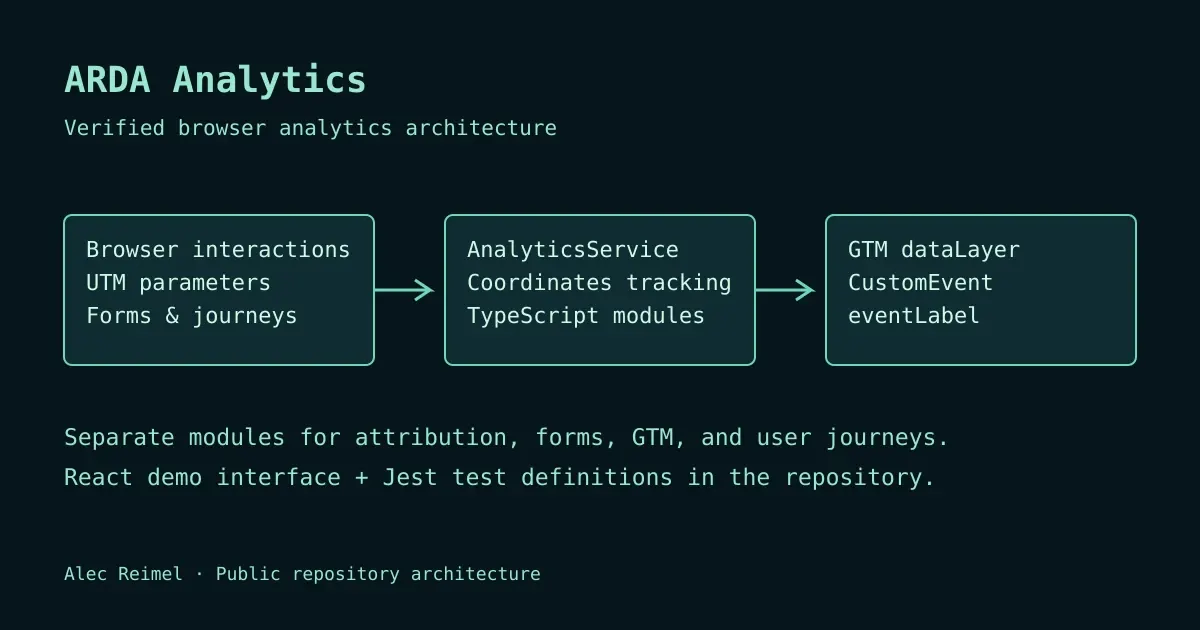
The central AnalyticsService coordinates smaller modules for UTM parameters, form fields, GTM event pushes, and user journey tracking. This separation gives each concern a defined place in the code while keeping an integration entry point for the application using the plugin.
- Campaign attribution captures UTM values and makes them available to form workflows.
Form helpers detect and add attribution fields, with a MutationObserver option for dynamically inserted forms.
- Event forwarding writes a CustomEvent object and eventLabel to the GTM data layer.
Journey triggers run callbacks when configured event combinations occur, with options for one-time execution.
Explore the
orchestration service
and the
GTM event module
to see these boundaries in the source.
Validation and Integration Boundaries
The repository contains Jest tests for initialization, configuration changes, event pushes, click and form handling, and cleanup. These definitions document intended behavior; their presence alone does not establish that a particular release passes every test. A site adopting the plugin still needs to verify its own events, GTM configuration, and reporting destination.
The plugin forwards browser events; it does not replace an analytics reporting platform. Data collection and consent choices also belong to the integrating site. Performance and data quality should be measured in that site’s actual environment rather than inferred from the plugin’s architecture.
Review the
test definitions
and
project repository
.
What This Project Demonstrates
Browser API integration, modular TypeScript services, event-driven behavior, and a React interface for exploring developer-facing functionality. It connects frontend implementation with the practical needs of analytics integration.
Hiring for a role involving frontend applications or developer tools?
Get in touch
or see my
professional overview
.
- analytics
- google-tag-manager
- javascript
- typescript
- plugin
- web-development